
AI Tools We Actually Use: A 2026 Update for UK Marketing Teams

In 2024, or the AI stone-age as we call it, I published an article covering the main tools we were using at the time. Every one of those tools has been replaced over the past two years with a leaner, more intentional stack. I felt it was time to provide an update.
The previous article included tools like Jasper, Copy.ai, Surfer SEO, Clearscope, Hootsuite, Buffer and Mailchimp. They were either brand-new AI-native tools or legacy tools integrating AI. Our 2024 article was written at a time of deep experimentation and learning. GPT-4 had launched, marking a turning point in the industry, and our internal experimentation continued to go deeper.
Since 2024, my aim has been to transform our business into an AI-native agency - not just an agency that uses AI. They aren’t the same thing. The market is moving faster than it has during any previous technological shift, and we feel obligated to stay at the front edge.
As of August 2026, our philosophy is no longer about how many tools we are using but rather how we structure our data, knowledge and strategies and then layer on as few tools as possible. Simplicity and effectiveness define the new model.
The rewrite below reflects that change. It discusses the tools we use every day, with some concrete, real-life examples of how we use them.
The Two Pillars
Wispr Flow
By now, anyone following the AI space should know about voice-to-text. You speak and the system translates your voice into clean text. The idea isn’t new, but traditionally, it was more for short, snappy things - like text messaging or basic note-taking. It was slow to load and would make mistakes.
When it comes to prompting LLMs with ideas, plans, details and strategies, accuracy and speed matter. Wispr Flow provides us with both.
The global average typing speed is 40 words per minute (WPM), but with a tool like Wispr Flow, it’s now possible, even simple, to drastically improve that. Personally, I’m now averaging 155 WPM - almost four times the average.
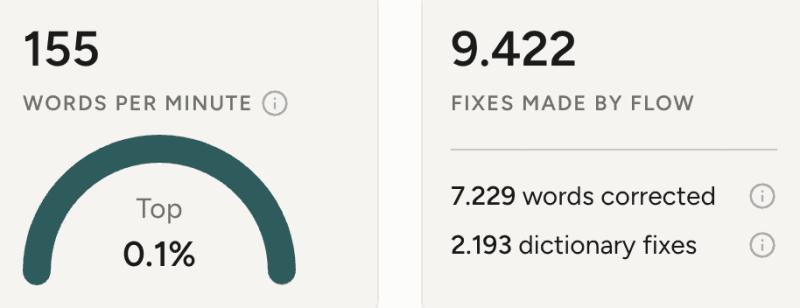
Wispr Flow is incredible. Its error rate is tiny, and it is always improving (see the total corrections and new words it has added above). But it’s the speed I love most. It can turn long stretches of constant talking into words on the screen in seconds. This is the secret sauce. It allows you to provide LLMs with much deeper detail, helping to make the output more contextual and accurate.
Cursor
Many of our customer websites are AI-coded, driven by human designers and developers to ensure coding agents are working properly. “Vibe coded” websites are riddled with problems that affect user experience, SEO rankings and more. It’s one thing to use AI to design something that looks great; it’s another thing to build something that actually works.
Effective website production needs a tool that allows you to keep an eye on things like file structure, SEO details and design across different screen sizes. While free options such as VS Code are great, we use Cursor as our coding platform of choice.
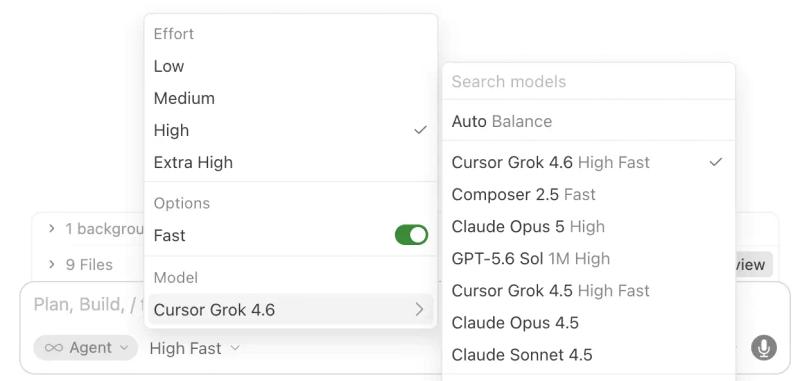
Cursor, which is now owned by SpaceX and deeply integrated with the Grok suite of LLM models, is our coding platform of choice for three reasons:
- Cloud-Based Agents. We can connect Cursor to our codebases via a secure cloud and work fully remotely across devices, rather than always needing to work from the same machine. Being able to fix website bugs from my iPhone has been a game-changer.
- Multi-Model Support with One Invoice. Using different models for different tasks is a huge unlock. Not all models are created equal. The new Grok 4.6 is fantastic at coding but poor at planning. Anthropic’s Opus 5 is great at designing, but it overcomplicates coding. Cursor allows you to switch between them easily, without needing separate subscriptions or API access.
- Separate Agent and IDE Screens. This is a powerful distinction and one that has allowed us to further reduce the tools we use and pay for. Working in a full IDE window is great when you’re building a new feature, but it’s usually overkill for day-to-day AI use, like back-and-forth planning or strategy work. Most people would use Claude or ChatGPT for the latter; however, Cursor provides both without complicating the set-up. One window for agent work and another for code work.
API and MCP
Cursor connects to various API tools and MCP servers, giving us deeper research and reducing the need to constantly switch apps. Here are the four I use every single day.
Firecrawl
We use Firecrawl constantly to scrape websites and retrieve content. This is especially helpful when rebuilding an existing website on a new platform, as we did with Bell and Son, a home renovation company in Newcastle that we recently helped move from WordPress to custom architecture. In Cursor, we can clean up the imported content manually or with an agent, fix major SEO issues, ensure the URL architecture matches, and move it to the new website. This helps us ensure clean SEO migrations.
Competitor analysis, research, strategy: literally anything you can think of that involves reading or retrieving content on the web. Firecrawl handles it all for us.
DataForSEO
Keyword and search data, straight from the source. When we're sizing a market or planning content, the numbers come from DataForSEO rather than an off-the-shelf tool's estimate. ZeroDryTime recently asked whether expanding one of their Scotland territories was worthwhile. We pulled live search volumes for 100+ terms across their existing Scotland postcode districts, ran geo-specific SERPs to see who actually holds the top spots for carpet cleaners in Stirling, and checked every Google Business Profile within 30km. That gave them a real demand figure to make the call on before a penny of budget went near it. ZeroDryTime Stirling now exists because we knew the demand was there.
Resend
Resend is the email layer on everything we build. For our website, when someone fills in a form, Resend delivers the notifications. It sounds mundane, but Resend allows you to do all sorts of things with email, especially when you connect them to AI tools.
A recent example is our Link Scout AI Agent, which we built to track places where our agency is mentioned. Directory sites or external pages will sometimes publish an incorrect phone number or web address. Our Scout searches for these mentions, emails the publisher on my behalf and requests a correction. It then logs what it did, so it doesn’t chase the same one again.
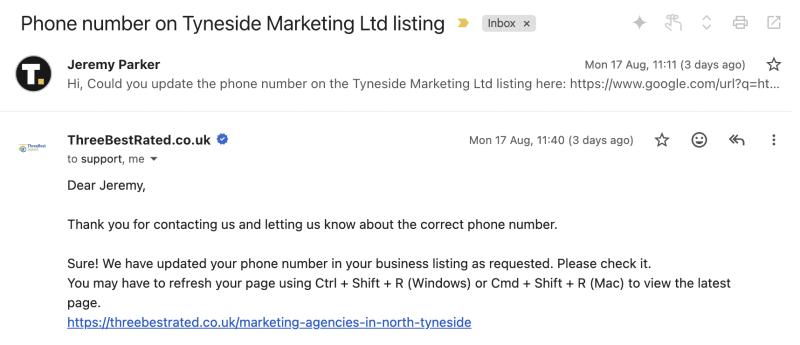
Other than our main inbox, our agency’s entire email flow is powered by Resend APIs.
Wispr Flow
Yes, the tool I discussed at the top of the page. With Cursor connected to Wispr Flow via the official MCP, I can pull voice transcriptions manually or sweep them on a schedule. Meeting recordings, ideas for a new feature, interview notes, even random notes I’ve made while I’m out walking: all contextual information that can be pulled into Cursor and actioned with AI.
There are so many examples of how I use this, but here’s my favourite:
Every week, usually on a Sunday or Monday morning, I sit down to plan the week ahead. Before I plan anything, a Cursor agent reads the transcripts from Wispr from every meeting in the past week - client calls, internal sessions, the notes I dictated on a walk - and pulls out the ideas, decisions, who agreed to what, and anything that changed: a project going live, a deadline moving, a new client onboarding.
It then checks all of that against reality - the free time in my calendar, projects in our project management tools and previous planning notes.
I get a clean summary of the things I need to focus on and the available time I have to do it. I've stopped starting Mondays by trying to remember what happened last week. The system already knows, because it was listening.
What changed since 2024
Every tool from our 2024 list is gone. Back then, we used AI tools to help us write, optimise and schedule content. Now, our tools connect to our data, follow our processes and help us do the work.
That is the real change. Not better writing tools, but a better system underneath fewer tools.
Who this list is for
This list is for marketing teams doing the work. It is not a list of tools that will replace a marketing team.
If you run a small business and want the outcome without building this system yourself, that is what our AI marketing service is for. You can also read more about how a small agency does the work of 20.
The tools will change again
This list will be out of date again. That is inevitable.
The important part is the structure underneath it: a small number of tools, each with a clear job, all working from the same knowledge and client information.
The tools are replaceable. The system is what makes them useful.
Common questions
What AI tools do we use now?
There are others, but these are the core daily drivers:
- Wispr Flow for voice-to-text
- Cursor as the IDE with cloud agents
- Firecrawl for scraping
- DataForSEO for search data
- Resend for form notifications and email automations
- A blend of Anthropic, OpenAI and Grok models, depending on the need
What changed since the 2024 list?
Everything. In October 2024 we recommended Jasper, Copy.ai, Surfer SEO, Clearscope, Hootsuite, Buffer and Mailchimp. We use none of them today. The tools that mattered then helped you write and schedule; the stack that matters now does the work alongside you.
Are these tools for a small business owner or a marketing team?
A marketing team. Each tool does one job and none of them replaces having someone who knows what the marketing should be. A small business owner who wants the outcome without building a stack should look at AI marketing as a service instead.
 Written byJeremy ParkerFounder & Growth Marketing Specialist20 years of building and growing businesses across Australia, Dubai and the UK - now helping British businesses scale with systems that actually work.
More from Jeremy
Written byJeremy ParkerFounder & Growth Marketing Specialist20 years of building and growing businesses across Australia, Dubai and the UK - now helping British businesses scale with systems that actually work.
More from Jeremy More on Marketing

The Six Things Stopping Your Website From Being Fully Agent-Ready (and Why Most Businesses Should Stop at Four)
The Cloudflare Agent Readiness Score has six advanced Capabilities checks that nearly every site fails. We break down which two are worth shipping and why most businesses should skip the other four.

Cloudflare's Agent Readiness Score: What It Means, and What Happened When We Scored Our Own Site
Cloudflare's new Agent Readiness Score grades how AI-friendly your site is. We took our own site from 33 to a perfect score in an hour. Find out how we did it here.
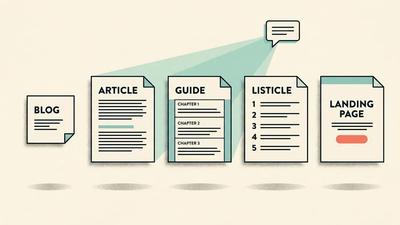
Blog, Article, or Listicle? A Small Business Guide to Content Types, Intent, and AI Search
What's the difference between a blog and an article? What is a listicle? Why do AI Overviews appear on some searches and not others? A plain-English guide for small business owners.